
Register on GamesPK Game
Getting started with GamesPK Game is easy. New users can create accounts in only a few steps, and then be able to view different games and features available in the platform. The registration process captures only the essential information needed to create a gaming profile.
GamesPK Game Registration Details
| Information | Details |
|---|---|
| Game Name | GamesPK Game |
| Website | GamesPKGames.pk |
| Category | Online Gaming |
| Registration | Available |
| Access | Mobile & Web |
| Account | Required for Registered Features |
| Language | English and Urdu |
| Platform | Mobile & Browser |
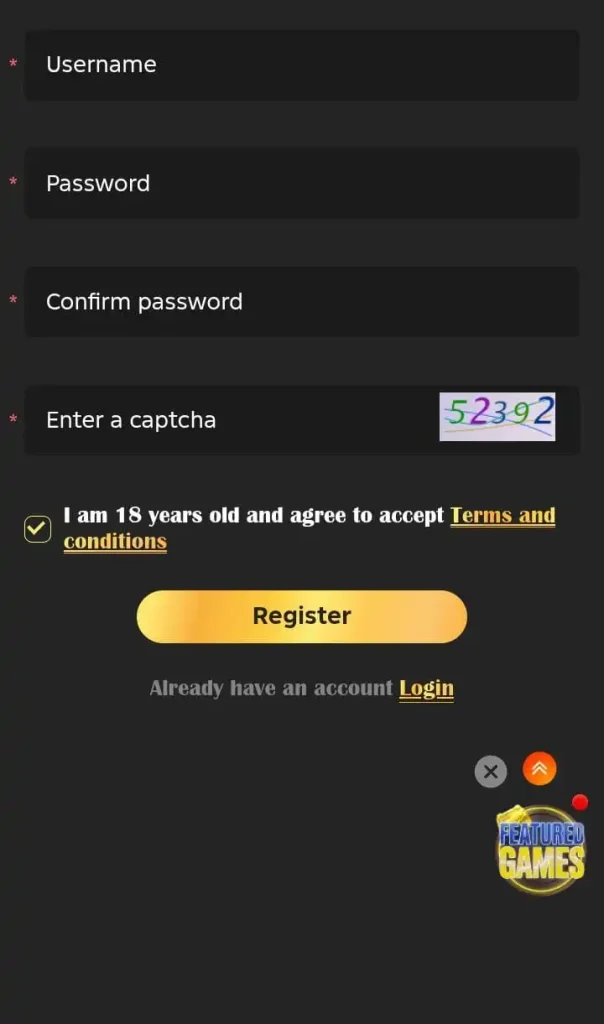
You can use the same login credentials each time you come back to GamesPK Game, because your account has been created. Your registered profile has your account details in it and keeps them in a single place, so that you can easily manage your gaming activities from your mobile or any other internet-connected device.
Why Register on GamesPK Game?
Creating an account gives you a personal profile instead of using the platform as an unregistered visitor. Your account can be used to access the features and games available to registered users.
Here are some reasons players may prefer creating an account:
- Convenient Access: Enter your registered details to automatically log in.
- Game Options: Check out all the games and other forms of entertainment we have to offer after signing up.
- Account Edits: Edit your account details and manage other relevant information from your account.
- Mobility: Register and access your account from any smartphone you have with you.
- Stored Information: The details you provided when you registered make it easy for you to come back and use our services.
How to Register on GamesPK Game?
Creating your GamesPK Game account is straightforward. Follow these steps:
- Using your computer or smartphone, access your browser of choice.
- Go to GamesPKGames.pk.
- Look for the Register or Sign Up option.
- Fill out the information requested in the registration form.
- Make your password strong.
- Check that your information is correct before submitting.
- Complete any verification the website requests.
- Finally, submit your registration form.
- Store your login info for future use.
- Enjoy GamesPK!
GamesPK Game Registration on Mobile
Rather than registering on your computer, you can also use your phone. Just use your mobile browser and load GamesPKGames.pk, then click the registration option.
You have to provide your correct and complete information. Make sure that while you are registering, your internet is working and there are no interruptions, or your phone is not going to sleep. You can try to reload the page or use an updated browser to load the registration page.
What Information Is Needed for Registration?
The exact information requested can vary depending on the current registration form. Usually, an online gaming platform may ask for basic account details such as:
- Mobile number or username
- Password
- Verification information
- Other details required by the platform
Tips for Creating a GamesPK Game Account
A little attention during registration can help you avoid common account problems later.
Use the Right Information
You must provide the correct information while registering. Specific information may be used to verify or recover your account.
Create the Right Password
Make a password that can not be easily guessed. Avoid using simple number sequences or your name.
Keep Your Login Information Private
Your password must be private. Never send your password to your friends or any stranger, or to a person who claims to be a GamesPK Game Account Support.
Check Your Internet Connection
Make sure your internet connection is strong and stable. A good connection may help to avoid glitches while filling out the registration form.
Use the Correct Site
You must be sure you are using the GamesPK Game website before you provide your account information.
GamesPK Registration Issues
Sometimes, registration may not work the first time due to multiple reasons, such as your phone number not being registered properly, a weak internet connection, issues with your browser, or other technical issues.
Should you face any of the above mentioned problems, you can try the solutions given below:
- Check the information you have entered and make sure it is correct.
- Check your internet connection and see if it is working.
- Refresh the registration page.
- Try using a different up-to-date browser.
- Clear your browser cache and see if the page behaves normally.
- Check if there is a verification message sent to you.
- Try again after some time if the service is unavailable.
Is GamesPK Game Registration Free?
Requirements may vary by platform and are subject to change. If there’s no registration fee shown on the page, registration may be free.
That being said, registration and gaming deposits or other paid activities should not be confused. It is always best to check the terms to see if there is a paid feature. No charges should be made until you have checked the terms.
GamesPK Game Account Security
Account security must begin at registration. Use a strong and unique password and avoid providing your username and password on sites and links that you are not sure about.
If you are using the GamesPK game on a shared computer or phone, always log out after each session. This minimizes the chance of someone opening your account.
What to Do After Registering?
Once your GamesPK Game account has been created, take a little time to understand the platform before using its features.
You can:
- Log in with your newly created account.
- Check your profile information.
- Explore the available game categories.
- Read the rules of games you are unfamiliar with.
- Review any available account settings.
- Check the platform’s current terms before making financial transactions.
Login After Registration
After successfully creating your account, you can return to the GamesPK Game login page whenever you want to access your profile.
Final Words
Creating a personal account gives you access to GamesPK Game’s many available gaming features; the first step is creating a game account. Follow the simple steps: open the website, fill in the registration form, and provide the information required of you to verify your account. Keep your login details a secret.
For a more pleasant experience, ensure you use the genuine website, protect your account details, and get familiar with the rules and terms of any game or feature you want to play before playing.
Register on GamesPK Game FAQs
How do I Register on GamesPK Game?
Visit GamesPKGames.pk, select the registration option, enter the required information, complete any verification step, and submit the form.
Can I Register on GamesPK Game using my mobile?
Yes, you can use a compatible smartphone browser to access the GamesPK Game registration page.
Do I need an account to use GamesPK Game?
Some features may be available without registration, but an account is generally required for personalized and account-based features.
What if I do not receive a verification code?
Check that your registered mobile number is correct and that your phone has a stable network connection. You can also try requesting another code if the option is available.
Can I use my GamesPK Game account on another device?
Your account may be accessible from another compatible device using the same registered credentials, subject to the platform’s current policies.
What should I do if registration fails?
Check your information and internet connection first. Refresh the page or try another browser. If the problem remains, use the platform’s official support option.